

In today’s digital landscape, many companies operate within a tangled web of different systems such as CRM, ERP, project management tools, communication platforms, and custom internal software.
The common problem is that most of these systems don’t talk to each other, leading to manual work, duplicated effort, and inefficiencies, especially in areas like sales, marketing, finance and administration.
SuiteStack is now a proud partner of Make (make.com), an integration and automation platform that enables companies to build smart, scalable integrations and workflows without relying on developers. This guide explains why Make is a game changer and how you can start using the platform to automate your business today.
What is Make?
Make is a visual integration platform that lets you connect apps, services, and databases to create automated processes. It functions as a central hub between systems and lets you build automated flows with an intuitive no-code / low-code interface.
 No API knowledge or coding required.
- With more than 3,000 supported apps, Make can connect virtually anything
How Much Does Make Cost?
Make is a subscription-based service with a “freemium” model, meaning it costs nothing to get started with integrations and automations. You can run many different integrations and workflows at the same time, and Make only charges based on the number of transactions/data movements (credits). If you have a small number of transactions, it’s very inexpensive; if you have a large volume, the cost increases accordingly. For comparison, 10,000 credits cost €29 per month.
Click here for the full price list.
When Do You Need Make?
Make is especially beneficial when you encounter:
-
Multiple systems that don’t communicate with each other
-
Manual processes across finance, project work, marketing, and sales
-
Bottlenecks caused by expensive or limited developer resources
Make Can Build Integrations 4–6× Faster
Since Make is a no-code/low-code platform, companies can build integrations 4–6 times faster than traditional custom development. This leads to lower costs, faster time-to-value, and less dependency on developers, making innovation more accessible.
When you no longer have to rely on expensive, fully booked developers for every system integration, innovation suddenly becomes easy.
Okay, I’m ready!
Can SuiteStack set up a free account for me and automate one of my workflows?
Use the button to create a free account. We’ll contact you once it’s done and set up a workflow.
If you’d rather have us handle this for you, book a meeting below and we’ll take care of it.
…or keep reading.
Examples of What You Can Automate with Make
Make supports 3,000+ systems with ready-made integrations. Below are examples of how it’s used in practice.
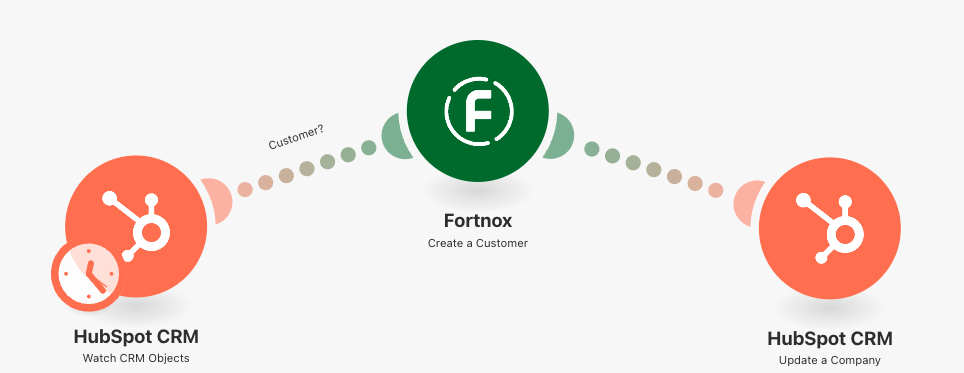
Fortnox + HubSpot:

When a deal is won in HubSpot:
-
Automatically create a customer in Fortnox
-
Automatically create a project, order, or invoice
-
Continuously sync customer data
-
Notify the sales team via Slack or Microsoft Teams
Visma + Microsoft 365

Automate the entire workflow:
-
New customers in Visma are automatically created in a SharePoint list
-
Invoices are automatically exported to OneDrive
-
Reminders are sent via Microsoft Teams
-
The finance team receives weekly summaries without lifting a finge
Business Central + Slack

When an invoice becomes overdue:
-
A Slack notification is sent to the finance team
-
A support ticket is automatically created in the support channel
-
Escalation happens automatically after X days
HubSpot + ERP (NetSuite, SAP, Finance & Operations, Sage, and more)

When a new lead comes in:
-
Automatically create customers and update contacts
-
Create orders, invoices, or projects when a deal is won
-
Sync contact data to the CRM
-
Update reports in real time
Slack + All Your Systems

Slack as a control panel:
-
“Create customer” → Make handles the rest
-
“Get latest order” → data is returned directly in Slack
-
Triggers for key events in finance, delivery, or customer support
Fortnox / Visma / Business Central + E-commerce (Shopify and others)

Examples:
-
Order → invoice is created automatically
-
Inventory levels are updated in real time
-
Delivery confirmations are sent automatically
-
Reporting runs without manual work
Does it sound interesting to learn more about Make? Would you like us to set up a free account for you and automate one of your workflows?
Want to get started?
We help you build the CRM and automation platform.
Book a short intro call. We listen, ask questions and point out the next step.
Book an intro call