Book a meeting

Make


AI automation you can build in real time.

Make is a no-code, low-code platform where you can visually manage integrations, automations and AI agents. The visual interface makes automation easy to build, whether you are working with customer data, streamlining marketing campaigns or syncing information across multiple systems.
 

What is Make?

Make.com is a no-code integration and automation platform where you can connect apps, data and processes, and build workflows visually without programming. Make supports visual automation, AI agents, integrations with 3,000+ apps and thousands of ready-made templates.


Sign up for a free account and test Make directly with your applications.

Use the button below to create a free account in Make. No credit card required. You can create up to 2 different scenarios (flows/processes).

1

Sign-Up

It’s completely free to get started and all functionality is available.
2

Connect all of
your application

Learn how to connect your systems to Make. Once it’s set up, you can reuse the connections again and again.
3

Start building and automate

Now that you’re set up, you can start building right away. There’s plenty of guidance and support available in the community.
integration-apps

Connect all of your apps you're already using


With Make, you get access to a large ecosystem of pre-connected apps and systems.

The platform supports over 3,000 integrations, making it easy to connect the tools you already use. That means faster workflows, better data quality and a more unified process, without unnecessary manual work.


Kick-start your integrations

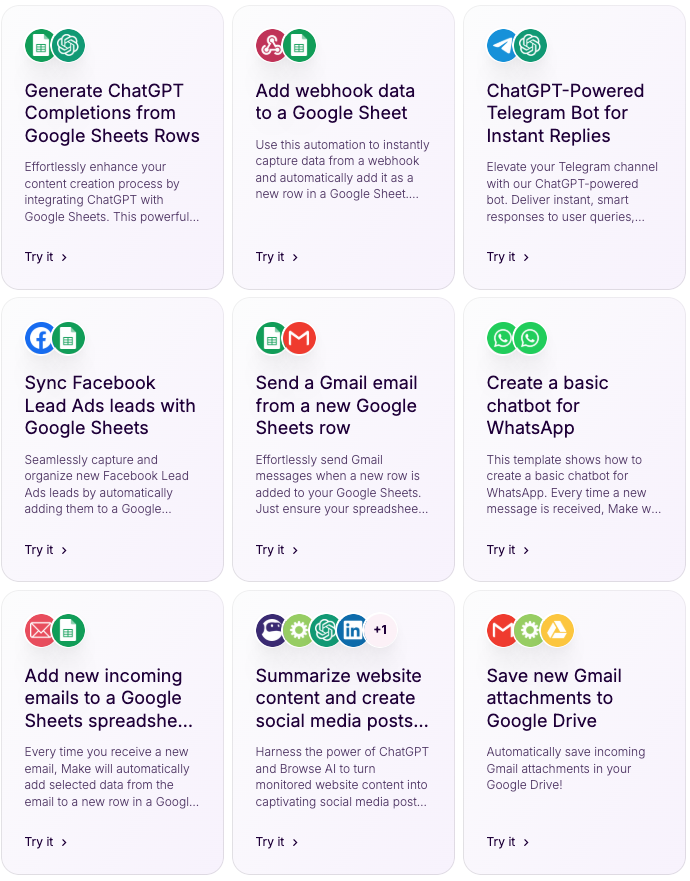
Make offers thousands of ready-made templates for automated workflows to help you get started quickly. The templates are designed to work out of the box, but as your business grows they can be fully customized to match your unique workflows in tools like HubSpot or other platforms.

 

Templates Make

Your Success is our Process

We use a structured process, inspired by our SUITE methodology, to make integrations and automations clear, predictable and effective.

Make.com+Logo


  • 1. Discovery & Scope
    We map your existing systems, data and goals, and define what a really strong setup for you.

  • 2. Design & Mapping
    We design your data flows, choose between native apps or a custom solution, and align on field and object mapping.

  • 3. Build & Configure
    We connect your systems, build any new integrations via APIs if needed, and configure your automations.

  • 4. Test & Validate
    We run tests and make sure the data is correct in all sending and receiving systems.

  • 5. Launch & Optimise
    We go live and train your team on how to manage the integrations. If we build agents for you, we fine-tune the prompts to achieve the best possible results.

Så jobbar vi

SUITE-metodiken är vår strukturerade modell för att lyckas med HubSpot-implementationer. Varje steg är utformat för att skapa tydlighet, minimera risker och säkerställa att ni snabbt får värde av er investering. Från uppstart och behovsanalys till utbildning och löpande support – metoden hjälper er att bygga en stabil grund för tillväxt och långsiktig framgång.
Collaboration_Linear_llustrations_Characters

S

Scope & Kickoff

Uppstartsmöte
Projektplan
Migreringsdetaljer

Blueprint_Linear_llustrations_Environmental

U

Use cases & Definitions

Dokument för egenskapsmappning
2 workshops
Genomgång av integrationer

Web Hosting_Linear_llustrations_Characters

I

Implementation & Deployment

Datamigrering
Rapporter
Automationer
Eventuell datarensning

Metrics_Linear_llustrations_Environmental

T

Testing, Training & Tailor

Testperiod i portalen
Utbildning för hela teamet
Skräddarsy systemet för att skala

Secure Access_Linear_llustrations_Environmental

E

Execution & Support

Go Live-support och underhåll av portalen
Retainer*

*Avtalas separat om behov finns

Professional Design

+ C

Easy and fast adjustments of elements is possible with Core template.

Frequently asked questions

Sometimes integrations, automations and systems can feel complex and overwhelming. Here you’ll find answers to the most common questions.

Which systems can you integrate using Make?

You can integrate any system that has an API. However, Make has already done the heavy lifting for you by integrating with 3,000+ popular standard apps, so you don’t have to build everything yourself. Ready to use from day one.

When should you use Make as your integration platform?

When you want to do more than just integrate. Make lets you add automation and logic into your integrations so your system can act intelligently. Make also supports building your own AI agents or connecting external ones via its MCP server interface.

How do you make sure no data is lost?

Make handles all integrations with full support for error handling, queuing and interruptions. If something unexpected happens with an external system, Make queues the data that should be sent or received.

Is Make expensive to use at scale?

No, Make is a very cost-effective platform. The free version already lets you build 2 custom scenarios. After that, you pay in credits based on how complex your scenarios are and how much data is moved between systems. A typical company often does well with around EUR 50–100 per month.

What is an AI-Agent in Make?


An agent is essentially a program that uses:

- Instructions and goals

- Tools and integrations (for example web searches or other connected systems)

- Data and context

- Memory and state

In Make, you can build your own AI agents that use your scenarios and integrations, with access to the data and tools you choose. You can also use external agents from OpenAI, Claude or other agent providers and connect them via the MCP server interface in Make.


Så jobbar vi

SUITE-metodiken är vår strukturerade modell för att lyckas med HubSpot-implementationer. Varje steg är utformat för att skapa tydlighet, minimera risker och säkerställa att ni snabbt får värde av er investering. Från uppstart och behovsanalys till utbildning och löpande support – metoden hjälper er att bygga en stabil grund för tillväxt och långsiktig framgång.
Collaboration_Linear_llustrations_Characters

S

Scope & Kickoff

Uppstartsmöte
Projektplan
Migreringsdetaljer

Blueprint_Linear_llustrations_Environmental

U

Use cases & Definitions

Dokument för egenskapsmappning
2 workshops
Genomgång av integrationer

Web Hosting_Linear_llustrations_Characters

I

Implementation & Deployment

Datamigrering
Rapporter
Automationer
Eventuell datarensning

Metrics_Linear_llustrations_Environmental

T

Testing, Training & Tailor

Testperiod i portalen
Utbildning för hela teamet
Skräddarsy systemet för att skala

Secure Access_Linear_llustrations_Environmental

E

Execution & Support

Go Live-support och underhåll av portalen
Retainer*

*Avtalas separat om behov finns

Professional Design

+ C

Easy and fast adjustments of elements is possible with Core template.